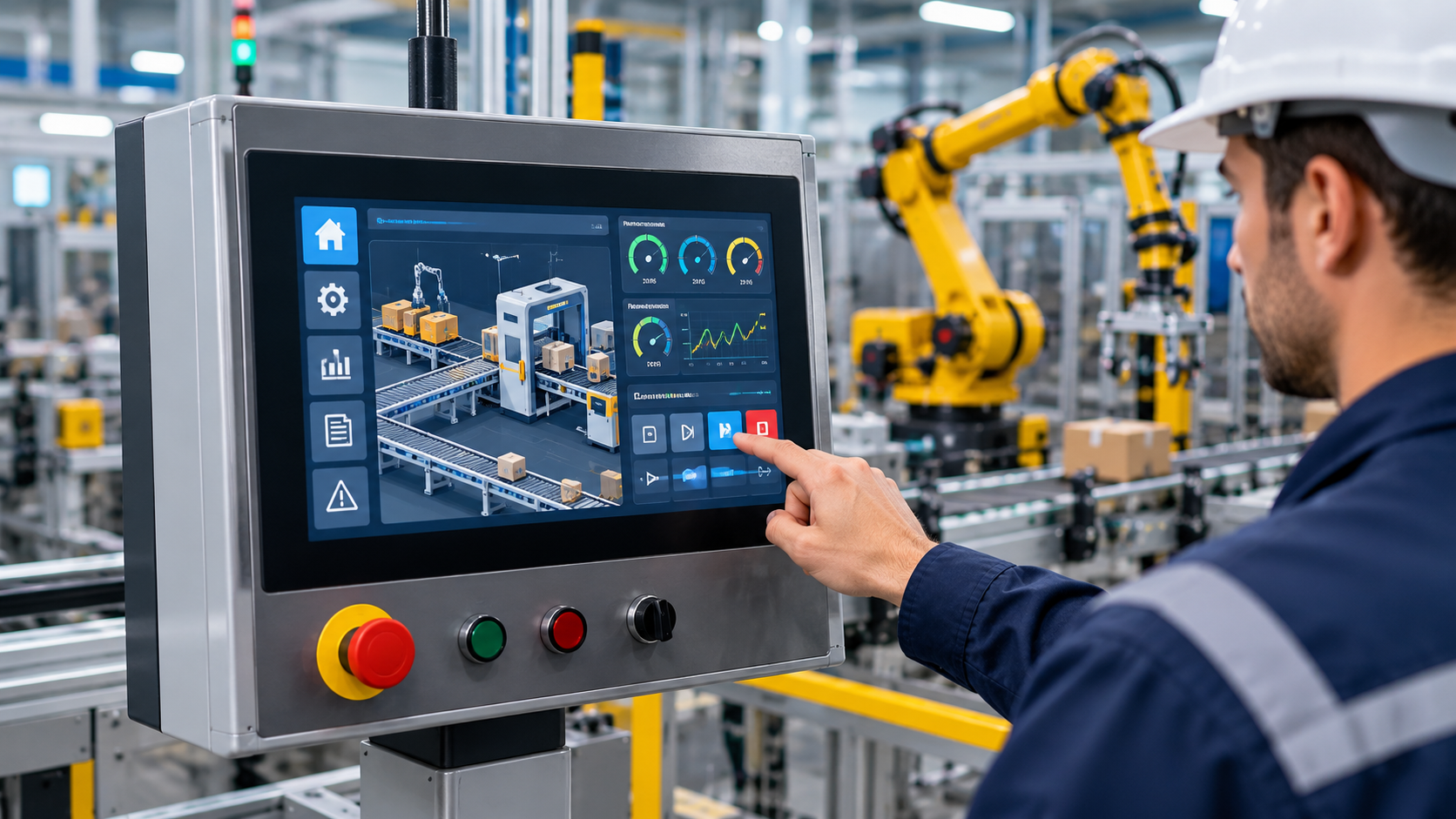
A Human Machine Interface (HMI) is a hardware and software-based interface that allows people to monitor, operate, and interact with industrial machines, equipment, and automated processes.
It presents operational information through screens, controls, alarms, and graphical displays, helping operators understand machine conditions and manage production activities.
HMI technology is widely used in manufacturing, process automation, power generation, water treatment, packaging, and industrial equipment. Modern systems combine touchscreen displays, industrial computers, communication networks, and visualization technologies to improve operational visibility and control.
Quick Facts About Human Machine Interfaces
Feature | Description |
|---|---|
Full Form | Human Machine Interface |
Primary Purpose | Interaction between operators and machines |
Main Functions | Monitoring, control, visualization, and alarm management |
Common Hardware | Touchscreen panels, industrial PCs, operator terminals |
Interface Types | Panel-based, PC-based, web-based, mobile, and embedded HMI |
Communication | Industrial Ethernet and supported fieldbus protocols |
Main Applications | Manufacturing, energy, utilities, process automation |
Related Technologies | PLC, SCADA, DCS, industrial IoT |
Common Standards | ISA-101, ISA-18.2, IEC 62443 |
Main Benefits | Operational visibility, usability, and process supervision |
What Is a Human Machine Interface?
A Human Machine Interface is an interface through which an operator interacts with an industrial machine or automated system. It translates information from controllers and connected equipment into visual information that people can understand and use.
An HMI may display machine status, production values, operating conditions, alarms, and process trends. Depending on its configuration, operators can also use it to enter commands, adjust permitted settings, start or stop equipment, and select operating modes.
For example, an HMI connected to a packaging machine may display conveyor speed, product count, machine temperature, operating mode, and fault notifications. An operator can use the screen to monitor the process and perform authorized actions without directly interacting with the machine's internal control logic.
An HMI is not necessarily the controller responsible for executing machine operations. In many industrial installations, a Programmable Logic Controller (PLC) performs the control logic, while the HMI provides the operator-facing interface.
Why Human Machine Interfaces Matter in Industrial Automation
Industrial machines generate operational information that must be presented clearly to operators. Without an effective interface, understanding machine conditions, identifying faults, and responding to process changes can become difficult.
HMI systems organize this information into screens, indicators, alarms, and interactive controls. Their design influences how quickly operators recognize abnormal conditions and understand the current state of production equipment.
Key reasons industrial facilities use HMI technology include:
Operational visibility: Displays machine status and process measurements in an organized format.
Equipment interaction: Provides authorized controls for operating connected machinery.
Alarm awareness: Communicates faults, warnings, and abnormal operating conditions.
Production monitoring: Displays operating values, production counts, and equipment status.
Process consistency: Helps operators follow defined operating procedures.
Troubleshooting support: Presents diagnostic information that assists fault identification.
Centralized supervision: Allows multiple machine functions to be viewed through an integrated interface.
An effective HMI reduces unnecessary complexity by presenting relevant information according to the operator's responsibilities and the process being controlled.
Understanding the Human Machine Interface Concept
Simple Explanation
Consider an automated manufacturing machine that fills containers with a liquid product. Sensors measure the liquid level, a PLC processes the signals, and control equipment operates the filling mechanism.
The HMI displays information such as machine status, filling progress, container count, and detected faults. An authorized operator can select an operating mode or adjust permitted parameters through the interface.
The HMI acts as the communication point between the operator and the automation system. It does not replace the sensors, actuators, or controller responsible for executing the physical process.
Relationship Between HMI and Industrial Control
An HMI usually operates as part of a larger automation architecture. It communicates with controllers and other industrial equipment to exchange process information.
The typical relationship involves three functional layers:
Field layer: Sensors, switches, motors, valves, and other physical devices interact with the process.
Control layer: PLCs, DCS controllers, or other automation controllers execute control logic.
Operator interface layer: HMI terminals display information and provide authorized operator commands.
This separation helps distinguish machine control from operator interaction. It also allows the interface to be designed around human needs without requiring operators to understand the underlying controller programming.
How a Human Machine Interface Works
Step 1: Collecting Equipment Data
Sensors and connected devices generate information about the machine or industrial process. Measurements may include temperature, pressure, speed, position, flow, level, and equipment status.
The information is transmitted to an industrial controller or another connected data source.
Step 2: Processing Information Through Controllers
A PLC or other controller receives input signals and executes programmed control logic. It determines the appropriate machine response based on configured conditions, operating sequences, and control parameters.
The controller also makes selected operating information available to the HMI.
Step 3: Communicating With the HMI
The HMI communicates with the controller through a supported industrial communication protocol. It reads configured data points, often called tags, and updates the corresponding interface elements.
Communication configuration determines which values can be displayed and which operator commands can be transmitted.
Step 4: Displaying Information
The HMI converts controller data into visual elements such as:
Numerical process values
Equipment status indicators
Graphical process diagrams
Alarm messages
Production counters
Historical trends
Operating mode displays
The presentation should make important operating information easy to recognize.
Step 5: Receiving Operator Commands
An operator can interact with permitted controls through a touchscreen, keyboard, mouse, or physical buttons. Commands may include selecting an operating mode, acknowledging an alarm, or entering an approved setpoint.
The controller evaluates commands according to its programmed logic and safety conditions. The HMI should not be treated as a replacement for independent machine safety functions.
Step 6: Updating Machine Information
After an action or process change, the controller communicates updated values and equipment status to the HMI. The display refreshes to reflect the latest available information.
This creates a continuous information exchange between the operator, interface, and automation system.
Human Machine Interface Workflow Table
Stage | Main Component | Function |
|---|---|---|
Input collection | Sensors and field devices | Generate machine and process information |
Control processing | PLC or DCS controller | Execute automation logic |
Communication | Industrial network | Transfer information between devices |
Visualization | HMI display | Present machine conditions |
Operator interaction | Touchscreen or input device | Receive authorized commands |
Command execution | Industrial controller | Validate and execute commands |
Feedback | Sensors and controller | Report updated operating conditions |
Human Machine Interface Architecture
An industrial HMI architecture describes how the operator interface connects to controllers, field devices, communication networks, and information systems. Its configuration depends on the complexity of the machine, the number of connected controllers, and the monitoring requirements.
Operator Interface Layer
This is the user-facing part of the system. It includes touchscreen panels, industrial monitors, keyboards, physical controls, and graphical displays.
Operators use this layer to review process conditions, navigate screens, acknowledge alarms, and enter permitted commands.
HMI Runtime and Visualization Layer
The runtime environment displays configured screens and processes user interactions. It manages graphical objects, data tags, navigation, alarm displays, and other interface functions.
The visualization layer determines how information is organized and presented to operators.
Communication Layer
The communication layer connects the HMI with PLCs, DCS controllers, remote I/O systems, and other industrial devices. It uses supported communication protocols to exchange process data and commands.
Control Layer
The control layer contains PLCs, DCS controllers, and other automation equipment responsible for executing programmed operations. It evaluates inputs, applies control logic, and sends commands to connected machinery.
Data and Information Layer
Depending on the installation, this layer may include historical databases, production information systems, alarm records, and reporting applications. It supports longer-term analysis beyond immediate machine operation.
Main Components of an Industrial HMI System
Component | Primary Function | Industrial Application |
|---|---|---|
HMI touchscreen panel | Displays information and accepts operator input | Machine operation |
Industrial PC | Runs visualization and monitoring applications | Complex automation systems |
HMI runtime environment | Executes configured interface screens | Process visualization |
PLC or DCS controller | Executes automation logic | Machine and process control |
Communication interface | Exchanges information between devices | Industrial networking |
Data tags | Represent controller values and states | Real-time monitoring |
Alarm management | Displays abnormal operating conditions | Fault awareness |
Historical data system | Stores process information | Trend analysis and reporting |
Input devices | Enable operator interaction | Command entry |
Power supply | Provides electrical power to equipment | System operation |
Types of Human Machine Interfaces
HMI systems can be classified according to their hardware configuration, computing architecture, and method of operator access. The following categories describe commonly used industrial implementations.
1. Basic Operator Panels
Basic operator panels use simple displays, physical buttons, indicator lights, or limited graphical elements to provide essential machine information.
They are commonly used in smaller machines where operators need straightforward status information and a limited number of controls.
Advantages:
Simple operator interaction.
Suitable for basic machine functions.
Limited interface complexity.
Useful for compact automation equipment.
2. Touchscreen HMI Panels
Touchscreen HMI panels use an integrated display that allows operators to interact with graphical controls directly. They can present machine diagrams, numerical values, alarms, production information, and operating settings.
These industrial HMI panels are common in packaging machinery, manufacturing equipment, and production lines.
Advantages:
Direct screen interaction.
Flexible graphical layouts.
Multiple functions within one display.
Convenient access to operating information.
3. PC-Based HMI Systems
PC-based HMI systems use industrial computers to run visualization applications. They can support more complex graphics, multiple communication connections, historical records, and integration with other industrial information systems.
These systems are suitable for larger installations requiring extensive operator monitoring and data presentation.
Advantages:
Support for complex interfaces.
Expanded data visualization.
Integration with multiple controllers.
Flexible computing capabilities.
4. Embedded HMI Systems
Embedded HMIs are integrated into machines or specialized equipment. Their interface and computing functions are designed around the requirements of a particular device or application.
They are commonly found in specialized industrial machinery, equipment control units, and compact automation products.
Advantages:
Application-specific functionality.
Compact system configuration.
Integrated equipment interaction.
Consistent interface for dedicated operations.
5. Web-Based HMI Systems
Web-based HMI systems provide access to selected interface functions through supported web browsers and network connections. Depending on the architecture, operators or authorized personnel may access process information from approved computers or other devices.
These systems can support distributed monitoring, but network security, user authentication, and access permissions require careful configuration.
Advantages:
Browser-based access.
Flexible monitoring arrangements.
Support for distributed operations.
Integration with selected information systems.
6. Mobile HMI Systems
Mobile HMI systems provide selected monitoring and control functions through tablets or other portable devices. They may be used for equipment inspection, maintenance activities, or authorized operational monitoring.
Mobile access must be designed around network reliability, device security, user permissions, and the risks associated with remote commands.
Advantages:
Portable monitoring capabilities.
Flexible access to selected information.
Support for maintenance workflows.
Convenient viewing of equipment status.
Human Machine Interface Type Comparison
HMI Type | Hardware Configuration | Main Application | Key Strength |
|---|---|---|---|
Basic operator panel | Simple display and physical controls | Small machines | Straightforward operation |
Touchscreen HMI | Integrated industrial display | Production machinery | Direct graphical interaction |
PC-based HMI | Industrial computer | Complex automation | Advanced visualization |
Embedded HMI | Integrated equipment interface | Specialized machines | Application-specific design |
Web-based HMI | Network-connected interface | Distributed monitoring | Browser-based access |
Mobile HMI | Tablet or portable device | Authorized mobile monitoring | Portability |
Human Machine Interface Hardware and Software Requirements
An industrial HMI system requires compatible hardware, communication interfaces, visualization capabilities, and appropriate security arrangements. The exact configuration depends on the application and operating environment.
Industrial Display Requirements
The display should provide sufficient screen space, readability, brightness, and viewing angles for its installation environment. Industrial panels may need protection against dust, moisture, vibration, temperature variations, and physical contact.
Processing and Memory Requirements
The processing hardware must support the visualization application, connected data points, screen complexity, communication tasks, and historical information requirements.
Larger HMI applications may require industrial computers rather than compact operator panels.
HMI Programming and Configuration
HMI programming involves creating graphical screens, configuring data tags, defining navigation, setting alarm displays, and establishing communication with controllers.
The engineering process should also include user permissions, operating procedures, and testing of all interactive functions.
Communication Protocols
The HMI must support the communication methods used by connected industrial devices. Common protocols and technologies include:
Modbus RTU and Modbus TCP.
PROFINET.
EtherNet/IP.
OPC UA.
PROFIBUS.
Serial communication interfaces.
Protocol compatibility must be confirmed for the specific controller, HMI platform, and network configuration.
Environmental and Electrical Requirements
Industrial HMI equipment must be suitable for the installation environment. Important considerations include:
Operating temperature and humidity.
Electrical supply requirements.
Electromagnetic interference.
Vibration and shock resistance.
Enclosure protection ratings.
Grounding and electrical safety.
Accessibility for inspection and maintenance.
Cybersecurity Requirements
Industrial HMI systems should use appropriate authentication, access permissions, network segmentation, secure configurations, and controlled update procedures.
Remote connectivity should be restricted to authorized users and approved communication paths. Security measures should be designed as part of the wider industrial automation system.
HMI vs PLC vs SCADA: Understanding the Differences
HMI, PLC, and SCADA are related technologies, but they perform different functions within industrial automation.
An HMI provides the operator interface, a PLC executes programmed machine-control logic, and SCADA provides supervisory monitoring and data acquisition across equipment or distributed processes.
Feature | HMI | PLC | SCADA |
|---|---|---|---|
Full Form | Human Machine Interface | Programmable Logic Controller | Supervisory Control and Data Acquisition |
Primary Role | Operator interaction | Automated control | Supervisory monitoring |
Main Function | Visualization and commands | Logic execution | Data collection and supervision |
Hardware | Panels and industrial computers | Industrial controllers | Servers, workstations, and communication equipment |
Operator Interaction | Direct | Usually through an interface | Through supervisory screens |
Data Handling | Displays selected process data | Processes control data | Collects and organizes operational data |
Typical Application | Machine monitoring | Machine automation | Multi-process or distributed monitoring |
HMI vs SCADA
An HMI is generally the operator-facing interface for a machine, process, or control system. SCADA is a broader supervisory architecture that can incorporate multiple HMIs, communication networks, controllers, and data acquisition functions.
A SCADA system may contain several operator interfaces, while an individual HMI can operate independently as part of a smaller machine-control installation.
HMI vs PLC
A PLC executes control logic and directly interacts with connected inputs and outputs. An HMI displays information from the PLC and provides an interface for authorized operator commands.
The two systems complement each other, but an HMI does not normally replace the real-time control responsibilities of a PLC.
HMI vs DCS
A Distributed Control System distributes control functions across multiple controllers and provides integrated plant-wide supervision. HMI technology supplies the operator-facing displays used to interact with the DCS.
A DCS is therefore a broader control architecture, while an HMI is one of its important operator-interaction components.
Benefits and Advantages of Human Machine Interfaces
Industrial HMI systems provide practical advantages by organizing machine information and giving operators a consistent way to interact with automated equipment.
Improved Operational Visibility
HMI displays bring important machine information into one interface. Operators can review equipment status, process measurements, production conditions, and active alarms without checking multiple physical indicators.
Faster Fault Identification
Alarm messages, diagnostic displays, and historical trends help operators identify abnormal machine conditions. Clear fault descriptions can reduce the time required to locate potential problems and coordinate corrective actions.
Better Production Monitoring
An HMI can display production counts, cycle information, operating status, and process parameters. This information helps supervisors and operators understand how equipment is performing during production.
Consistent Machine Operation
Standardized screens, navigation structures, and control arrangements make it easier for operators to work with different machines. Consistent interface design can also support operator training and reduce confusion.
Reduced Operator Complexity
Instead of interacting with numerous individual controls, operators can use organized graphical displays to access relevant functions. This is particularly useful in machinery with multiple operating modes and interconnected processes.
Improved Process Documentation
When integrated with historical data systems, HMI platforms can support operational records, alarm histories, and trend reports. These records help maintenance teams investigate recurring problems and evaluate process changes.
Industry Applications of Human Machine Interfaces
Manufacturing and Production Lines
Manufacturing facilities use industrial HMI panels to monitor machinery, production sequences, equipment status, and operating parameters. Operators can view production information and interact with permitted machine functions from a centralized display.
Common applications include assembly lines, machining equipment, material handling, and automated manufacturing cells.
Packaging and Food Processing
Packaging machinery uses HMIs to display conveyor status, filling operations, sealing temperatures, product counts, and production settings. Food processing facilities may use operator interfaces to supervise mixing, heating, cooling, and packaging operations.
Recipe selection and batch information can also be integrated into suitable HMI configurations.
Power Generation
Power generation facilities use operator interfaces to monitor selected equipment conditions, operating parameters, and alarm information. HMI systems may be integrated with larger control architectures supervising turbines, generators, auxiliary equipment, and related processes.
Oil and Gas Processing
Oil and gas facilities use HMI technology to display pressure, temperature, flow, equipment status, and process alarms. Interfaces may be connected to PLC, DCS, or SCADA architectures depending on the facility's automation requirements.
Water and Wastewater Treatment
Water treatment facilities use HMIs to monitor pumps, filtration processes, tank levels, flow measurements, and treatment equipment. Operators can review operating conditions and manage authorized control functions through graphical displays.
Pharmaceutical Manufacturing
Pharmaceutical production uses HMI systems for equipment monitoring, batch operations, process visualization, and selected production records. Interface design must account for access permissions, data integrity, traceability, and applicable regulatory requirements.
Automotive Manufacturing
Automotive production lines use HMIs to supervise robotic cells, conveyor systems, welding equipment, assembly operations, and machine status. Different operator interfaces may be connected to individual machines or integrated production systems.
Building Automation
Building automation systems use operator interfaces to monitor heating, ventilation, air conditioning, lighting, and selected electrical systems. Depending on the architecture, these interfaces may display equipment status, temperature readings, alarms, and operating schedules.
Industry Applications of HMI Systems Table
Industry | Typical HMI Application | Information Displayed |
|---|---|---|
Manufacturing | Production machine monitoring | Machine status and production counts |
Food Processing | Process and packaging control | Temperature and operating conditions |
Power Generation | Equipment supervision | Generator and auxiliary system status |
Oil and Gas | Process monitoring | Pressure, flow, and temperature |
Water Treatment | Pump and treatment monitoring | Tank levels and flow measurements |
Pharmaceuticals | Batch process visualization | Recipe and process information |
Automotive | Robotic production monitoring | Machine and cell status |
Building Automation | Facility equipment monitoring | HVAC and electrical conditions |
Human Machine Interface Standards and Safety
Industrial HMI design should consider operator usability, alarm management, electrical safety, and cybersecurity. Applicable standards depend on the type of automation system, industry, equipment, and installation location.
ANSI/ISA-101.01-2015: Human Machine Interfaces for Process Automation Systems
This standard addresses HMI design and management for process automation systems. It provides guidance on interface structure, display design, navigation, implementation, operation, and lifecycle management.
Its principles help organizations develop consistent interfaces that support operator awareness and effective interaction with industrial processes.
ISA-18.2: Management of Alarm Systems for the Process Industries
ISA-18.2 addresses the management of alarm systems throughout their lifecycle. It covers alarm philosophy, identification, rationalization, implementation, operation, maintenance, and performance monitoring.
Its application is particularly relevant to HMI alarm displays because poorly designed alarms can overwhelm operators and make important warnings harder to recognize.
IEC 62443: Industrial Automation and Control Systems Security
The IEC 62443 series addresses cybersecurity requirements and processes for industrial automation and control systems. It covers security considerations for system owners, product suppliers, integrators, and other relevant stakeholders.
HMI systems connected to industrial networks should be included in the wider cybersecurity risk assessment.
IEC 63303:2024: Human Machine Interfaces for Process Automation Systems
IEC 63303 provides requirements and guidance relating to HMI systems for process automation. It addresses human factors and HMI-related considerations within industrial process environments.
IEC 60204-1: Safety of Machinery – Electrical Equipment of Machines
IEC 60204-1 addresses electrical equipment requirements for machinery. It is relevant when designing and integrating HMI panels, operator controls, and associated electrical equipment into machine installations.
Compliance with an HMI design standard does not automatically establish overall machine safety. Risk assessment, protective systems, electrical design, and applicable local regulations must also be considered.
Common Human Machine Interface Challenges and Solutions
Challenge | Possible Cause | Practical Solution |
|---|---|---|
Complex screen layouts | Poor information organization | Use structured screen navigation |
Alarm overload | Excessive or poorly configured alarms | Apply alarm management principles |
Communication failure | Network interruption or incorrect configuration | Monitor communication status |
Slow screen response | Insufficient processing capacity | Review hardware and application performance |
Inconsistent displays | Lack of interface standards | Establish standardized HMI design rules |
Operator errors | Confusing controls or unclear labels | Improve usability and control identification |
Unauthorized access | Weak authentication and permissions | Implement access controls |
Data inaccuracies | Incorrect tag mapping or signal configuration | Verify data points and controller connections |
Limited visibility | Poor display sizing or screen design | Improve layout and information hierarchy |
Integration difficulties | Incompatible protocols or equipment | Confirm compatibility before integration |
How to Choose an Industrial HMI System
Selecting an appropriate industrial HMI system requires evaluating the machine, operating environment, communication architecture, interface complexity, and future expansion requirements.
Selection Factor | What to Evaluate | Importance |
|---|---|---|
Application type | Machine-level or process-level operation | Determines interface requirements |
Display size | Screen dimensions and resolution | Supports clear information presentation |
Touchscreen capability | Touch, physical buttons, or keyboard | Determines operator interaction |
Processing capacity | Application and data requirements | Supports responsive operation |
Communication protocols | PLC and network compatibility | Enables reliable data exchange |
Environmental rating | Dust, moisture, temperature, and vibration | Supports installation suitability |
Cybersecurity | Authentication and network protection | Protects industrial operations |
Alarm management | Alarm visibility and prioritization | Supports operator awareness |
Historical data | Trend and reporting requirements | Supports operational analysis |
Expansion capability | Additional equipment and data points | Supports future system changes |
Maintenance | Diagnostics and replacement requirements | Supports long-term operation |
Selecting HMI by Application
Small industrial machines: Basic operator panels or compact touchscreen HMIs may be sufficient.
Automated production lines: Touchscreen panels with machine status, alarms, and production monitoring are often appropriate.
Large industrial facilities: PC-based HMI systems may support more complex visualization and multiple controller connections.
Distributed operations: Web-based interfaces can support authorized monitoring across networked locations.
Specialized equipment: Embedded HMI configurations can provide application-specific interaction.
Maintenance activities: Mobile HMI arrangements may be suitable when portable monitoring is required and access is securely controlled.
The final selection should consider the complete system rather than the display alone. Controller compatibility, operating environment, security, and lifecycle support are equally important.
Maintenance Best Practices for Human Machine Interfaces
Regular HMI maintenance helps preserve display quality, communication reliability, application performance, and system security. Maintenance requirements depend on the equipment configuration and operating environment.
Screen and Hardware Inspection
Inspect touchscreen panels, display surfaces, physical buttons, connectors, and mounting arrangements. Check for physical damage, display abnormalities, and signs of environmental deterioration.
Communication Monitoring
Review communication status between the HMI, PLCs, and connected equipment. Investigate recurring communication interruptions, network faults, and inconsistent data updates.
Configuration Backups
Maintain secure backups of HMI project files, screen configurations, alarm settings, communication parameters, and other relevant application data. Verify that backup files can be restored using the approved recovery procedure.
Software and Firmware Updates
Apply approved updates according to the manufacturer's maintenance guidance and the facility's change-management procedures. Updates should be evaluated for compatibility with controllers, communication protocols, and existing applications.
Alarm and Display Review
Review alarm messages, priorities, navigation structures, and screen layouts periodically. Remove obsolete information and correct unclear labels through an authorized engineering process.
Cybersecurity Maintenance
Review user accounts, access permissions, authentication settings, and network connections. Restrict unauthorized access and follow established industrial cybersecurity procedures.
Environmental Protection
Check panel enclosures, cooling arrangements, electrical connections, and ventilation openings. Industrial HMI equipment should remain within its specified operating conditions.
Limitations of Human Machine Interfaces
Although HMI systems improve operator interaction, they have limitations that should be considered during system design and implementation.
Dependence on communication: Incorrect or interrupted communication can prevent the display from receiving current process information.
Limited control responsibility: An HMI generally depends on controllers to execute machine-control logic.
Operator dependency: Poorly designed interfaces can increase confusion and the possibility of incorrect commands.
Cybersecurity exposure: Network-connected HMIs may introduce additional security risks if access and communication are not properly protected.
Hardware limitations: Smaller panels may not support complex visualization or extensive historical information.
Maintenance requirements: Displays, communication interfaces, power supplies, and computing components require ongoing maintenance.
Integration complexity: Connecting equipment from different manufacturers may require additional configuration or communication gateways.
Information overload: Excessive alarms, indicators, and graphical elements can make important information difficult to recognize.
An HMI cannot independently guarantee safe machinery operation. Emergency stops, safety interlocks, and safety-related control functions must use appropriately designed safety systems rather than relying solely on ordinary HMI screens.
Future Trends in Human Machine Interface Technology
Industrial HMI With Advanced Visualization
Modern industrial interfaces increasingly use improved graphics, structured navigation, and context-sensitive displays. These developments aim to present complex process information in a format that operators can understand more easily.
Industrial IoT Integration
Industrial IoT connectivity allows HMI systems to exchange information with additional connected equipment and industrial data platforms. This can support broader monitoring and operational reporting when communication and cybersecurity requirements are properly addressed.
AI-Assisted Operator Information
Artificial intelligence may help organize operational information, identify unusual patterns, and provide contextual explanations of equipment conditions. Such capabilities should support human decision-making rather than replace validated control logic or safety functions.
Web-Based and Remote Monitoring
Web-based HMI technology continues to support flexible access to selected industrial information. Secure authentication, network segmentation, and controlled remote access remain essential when interfaces are accessible beyond the local machine environment.
Improved Human-Centered Design
Future HMI development is expected to place continued emphasis on usability, consistent screen structures, alarm prioritization, and operator situational awareness. These design principles can reduce unnecessary complexity in industrial control rooms and machine interfaces.
Greater Cybersecurity Integration
As industrial equipment becomes more connected, HMI security is increasingly integrated into broader industrial cybersecurity programs. Access management, secure communication, system hardening, and controlled configuration changes are important considerations.
Frequently Asked Questions About Human Machine Interfaces
1. What is a Human Machine Interface in industrial automation?
A Human Machine Interface is the hardware and visualization environment through which operators interact with industrial controllers and equipment. It displays machine information, process conditions, alarms, and authorized operating controls.
2. What are the main types of HMI systems?
Common types include basic operator panels, touchscreen HMI panels, PC-based HMI systems, embedded HMIs, web-based HMIs, and mobile HMIs. They differ in hardware configuration, computing capabilities, and operator access methods.
3. What is the difference between HMI and PLC?
An HMI provides the interface for monitoring and interacting with industrial equipment, while a PLC executes programmed control logic. They communicate to exchange process information and authorized operator commands.
4. What is the difference between HMI and SCADA?
An HMI is an operator interface, whereas SCADA is a broader supervisory monitoring and data acquisition architecture. A SCADA system can incorporate multiple HMIs, controllers, communication networks, and historical data systems.
5. What is HMI programming?
HMI programming involves creating graphical displays, configuring data tags, establishing communication with controllers, defining navigation, and setting up alarms and operator controls. The configuration depends on the machine and automation requirements.
6. Which communication protocols are used in industrial HMI systems?
Common communication technologies include Modbus RTU, Modbus TCP, PROFINET, EtherNet/IP, OPC UA, and PROFIBUS. The appropriate protocol depends on the connected controller, network architecture, and HMI capabilities.
7. Where are Human Machine Interfaces used?
HMIs are used in manufacturing, packaging, automotive production, power generation, oil and gas processing, pharmaceutical manufacturing, water treatment, and building automation. They provide operators with equipment information and authorized control functions.
8. What are the main components of an HMI system?
An industrial HMI system may include a touchscreen panel or industrial computer, visualization environment, communication interfaces, data tags, controllers, alarm functions, and historical data components. The exact configuration depends on application complexity.
9. Why is HMI design important?
Good HMI design organizes operational information, improves screen readability, and makes important alarms easier to recognize. Consistent navigation and clearly identified controls can also reduce operator confusion.
10. Can an HMI operate without a PLC?
An HMI can operate independently for certain display or data-processing functions, depending on its configuration. However, machine-control applications generally require a controller or another suitable control mechanism to execute the actual operating logic.
Conclusion
Human Machine Interfaces provide the operator-facing connection between people and industrial automation systems. Through graphical displays, touchscreen controls, alarms, and process information, HMI technology helps operators monitor equipment and manage authorized operations.
Different configurations, including touchscreen panels, PC-based systems, embedded interfaces, and web-based HMIs, address different industrial requirements. Successful implementation depends on appropriate hardware selection, communication compatibility, effective screen design, cybersecurity, and regular maintenance. As industrial automation develops, HMI technology continues to evolve toward more connected, informative, and human-centered operator environments.